Lync 2010 and Microsoft Office Compatibility

Seems to be a common question that is actually pretty easy to find with a Bing search but I thought I would post it any way.

Lync 2010 and Microsoft Office Compatibility

Capability

Microsoft Office 2003 (SP3)

Microsoft Office 2007

Microsoft Office 2010

Presence in Microsoft Outlook To and Cc boxes

Presence on hover

Presence always displayed

Presence always displayed

Reply with conference call from Presence menu

No

Yes

Yes

Presence in a Meeting Request on the Scheduling Assistant tab

No

Yes

Yes

Reply with IM or call from received e-mail toolbar or ribbon

No

Yes

Yes

Presence in Outlook From box

Yes

Yes

Yes

Reply with IM or voice from Presence menu

Yes

Yes

Yes

IM and presence in Microsoft Word and Microsoft Excel (smart tags enabled)

Yes

Yes

Yes

IM and Presence in Microsoft SharePoint (Outlook must be installed)

Yes

Yes

Yes

VoIPNorm

Lync End User Training

I just wanted somewhere to store this great collection of training links but also thought it would be good to share. So here they are:

Adoption and  Training :

http://www.microsoft.com/downloads/en/details.aspx?FamilyID=f01a17e2-bec0-42c7-b1ce-fd4842ab1c91

Training PACK :

http://www.microsoft.com/downloads/en/details.aspx?FamilyID=e9310f75-5025-4462-b42e-a6cf5cb34fe4

Quick Start Guides :

http://www.microsoft.com/downloads/en/details.aspx?FamilyID=1214a649-6de1-4c64-9086-4651dbabe898

What's New Video's & Articles :

http://www.microsoft.com/downloads/en/details.aspx?FamilyID=f9585b64-e96a-4801-b411-8671c232bdf2

Short Video's :

http://www.microsoft.com/downloads/en/details.aspx?FamilyID=420fe3f6-d4f9-47c8-b042-9cb11f570102

Work Smart :

http://www.microsoft.com/downloads/en/details.aspx?FamilyID=ff736048-bff7-4c70-b4f3-0834f0eb163e

Presence & IM Training :

http://www.microsoft.com/downloads/en/details.aspx?FamilyID=39fe5fb8-90ce-42b7-adec-7f8db3faf47a

Voice & Video Training :

http://www.microsoft.com/downloads/en/details.aspx?FamilyID=719ab200-4729-4fd0-879e-1e8ad3f63e3a

Conferencing & Collaboration Training :

http://www.microsoft.com/downloads/en/details.aspx?FamilyID=3a1f2a84-d7ac-43db-b225-4b97d95d0d38

Web App Training :

http://www.microsoft.com/downloads/en/details.aspx?FamilyID=c1d8c821-efbd-4c0d-ba03-0f68a0322570

Delegate Training :

http://www.microsoft.com/downloads/en/details.aspx?FamilyID=a6e28e1f-9126-489f-8421-121c88190b74

Attendant Training :

http://www.microsoft.com/downloads/en/details.aspx?FamilyID=09794bf0-362c-4f1d-92af-72b93e1c998e

RGS Training :

http://www.microsoft.com/downloads/en/details.aspx?FamilyID=8f93590d-3758-4b3c-9cf6-c6dc316b5c37

VoIPNorm

Polycom HDX Integration to Lync with ICE/STUN and TURN

So for those of you that read Jeff Schertz’s blog he recently wrote about the great Lync integration that has just been released with Wave 4 for the Polycom HDX and RMX lines. Native Lync integration is very cool and I am a big fan of what this can do. Even though Jeff goes in to some great detail there is one piece that I wanted to elaborate further that I think is a bigger deal than HD video and has been around for a little while now.

Below is a screenshot of Polycom HDX endpoint video call to my Lync client. This is a big deal namely because I am on the  MSIT Lync deployment and the Polycom HDX is not. The HDX is actually sitting on the Polycom network natively registered to the Polycom Lync deployment.

image

How is this possible you may ask? ICE/STUN and TURN protocols. Just like you would contact someone from a another organization using federation with Lync you can also do the same with Polycom HDX endpoints since they both support ICE/STUN/TURN and register as a native endpoint in Lync. This also means you can also use the HDX with VPNless remote access using the Lync Edge same as you would the Lync client for your own organization.

Lets take a look at a quick diagram. Below shows the ability to do federated video calls using the HDX.I have kept this really simple. I just want to highlight what is happening at a high level with the screenshot above. So in this case I have the HDX in my buddy list in Lync and I initiated the video call to the Polycom owned HDX device:

image

A similar scenario can also be achieved with remote access for a companies internal resources. In the diagram below the remote HDX of company A  is calling a Lync client from company A using remote access across the Lync Edge. The same can be achieved with the other internal HDX depicted. Seeing as both HDX’s can be registered as Lync endpoints it really opens up the ability to use the HDX’s as true Lync clients and utilize the Lync infrastructure.

image

Why is this so important? I think for most companies infrastructure consolidation through integration is going to be huge. Requiring less infrastructure in your DMZ or on premise to provide seamless video capabilities for remote and federated users shows the real value of the Polycom Microsoft partnership.

Comments welcomed.

VoIPNorm

Streaming Video Content or Using Two Web Cams during a Lync Meeting using ManyCam

Note:This is an unsupported configuration using a third party to plug in a video stream into Lync via the use of webcam drivers so use at your own risk.

Ever wondered how to stream mpeg or wma video files into a Lync meeting? Or how about using two webcams on the same PC with Lync? I got this question just recently from a company wanting to stream  prerecorded video through Lync to the masses over a Lync meeting. At the time I said no but stupid me should have realized where there is a will there is a way. This is not the most elegant of solutions such as using multicast or something more fancy dedicated to video distribution but it does achieve the desired effect.

Webcam simulator will add a virtual software camera to your operating system to allow you to play the recorded video instead of using your webcam. ManyCam can do the same thing but has a better user interface. Although on the main website it has some really stupid video effects that it shows as its main features it really has some better uses than that in my opinion. I have some snap shots below of a video I have playing during a meeting using ManyCam to inject a .wma file.

image

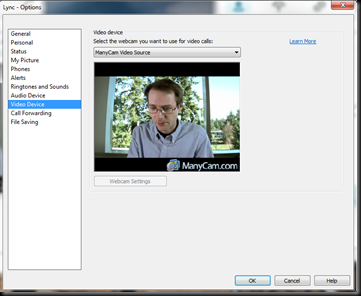
The virtual webcam is selected under the video settings in Lync.
image

The ManyCam software also allows PIP as well so I can have another source used in the same video feed. In this case I am using a web cam as the second feed embedded into the main picture.

image

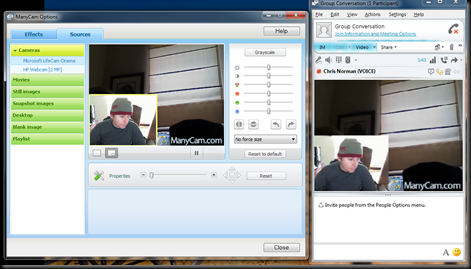
In this last screen shot I am using the ManyCam to integrate two web cams on the same PC into the one image that is feed into Lync. This is probably the most useful of all in my opinion because you might want a room view and then a focus in on one presenter.
image

So far I have found two issues. Firstly is audio when playing prerecorded video. Its not a big issue since you can relay the audio from the playing recording back through a microphone into the meeting but I have yet to find a clean solution. The second is getting rid of the ManyCam inbuilt advertising. Kind of annoying but not something that would force me to stop using it.

I didn’t discover this great use of the ManyCam software but I sure wish I had. It is really cool and I can envision some people getting good use from using it.

Comments welcomed and please let me know if you have tried this or other web cam software to do similar things.

VoIPNorm

Update: The issue of the advertising was solved by John K who also discovered this clever use of ManyCam. Just unselect the ManyCam logo under effects. Easy. Thanks John.

Virtual Video - no add