Media Bypass and Call Admission Control are two of the key new features in Lync 2010. There are some key elements to understand with both these new features. I am going to break it down into a four post series.
1. Regions, Sites and Subnets
2. Media Bypass
3. Call Admission Control (CAC)
4. CAC and Media Bypass dependencies
Overview
Media Bypass – This is the ability to allow media to flow directly between the Lync client and either a gateway of other associated endpoint without the need to flow the media through the Mediation Server. That is really a basic description and there are a number of different scenarios associated with Media Bypass but I just wanted to start with a simple description.
Having media flow around the Mediation Server predominately requires the use of G.711. This is not a complete departure from OCS 2007 R2 which used G.711 to improve the scalability of the Mediation Server when a client was within in 20ms of a Mediation Server. Now using Media Bypass it moves it to the next step of not having to flow that media session through the Mediation Server. Also you can now configure Lync for when this is supposed to happen rather than rely on a timing mechanism.
This doesn’t totally remove the use or need or RTAudio. There are still very compelling scenarios where RTAudio is both desired and required. A good example is Edge scenarios where media is traversing the Internet. For now though just understanding that Media Bypass improves scalability which in turns enables the colocation of the Mediation Server on the Frontend Server for Enterprise Edition and to collocate on Standard edition. Improving scaling also enables the Mediation to have a one to many gateway relationship which in OCS 2007 R2 was one to one.
CAC – This is the ability to control the bandwidth usage of your WAN links for both video and Audio. It also gives the ability to reroute to an alternative like the PSTN or Internet in situations where you have exceeded your configured bandwidth constraints. The concepts behind CAC should be well known to most that have worked with other VoIP systems, the method that Microsoft uses may differ but conceptually it is a similar theme.
Regions, Sites and Subnets
Reading through the documentation left me a little confused. It wasn’t until I started stepping through the configuration by breaking the two features apart did I begin to get a better understand how these features fit together. To help simplify the discussion I am going to focus on screen shots from the Lync Control Panel interface over PowerShell. I believe this particular feature is better suited to a UI over a command line especially with large enterprises. Although certain elements may be easier to manage through PowerShell, (such as adding additional subnets) building the initial Regions and sites structure is always going to be easier with a GUI.

The above diagram is a depiction two regions, North America and Europe, with the respective sites contained within each. I have tried to keep it simple but this is a great way to map out your infrastructure when building out more complex environments. For a small enterprise that only has one site the concepts applied here may not be applicable. Although Media Bypasss will still be something to be aware of, the concepts of Regions and Sites may not be required for your setup and you can just simply turn on Media Bypass for all calls. The only time this may be an exception for a small organization is for Wifi networks. You may decide to build a single site and leave your Wifi networks exempt from Media Bypass if you experience call quality issues using G.711 across Wifi.
What determines a region? This really depends on your network layout, the placement of you Lync assets (such as Survivable Branch Appliance and Mediation Servers) and where you plan to deploy CAC. Had I had a high density network in the Seattle area with multiple branches linking back to the Seattle datacenter I may have decided to declare that as a Region and broken it out into Sites.
Below is my North American Region with a Seattle Site and Subnet in the Lync Control Panel. I have the Seattle site which will contain my Mediation Server collocated on my Standard Edition Server. I have added the IP address 192.168.1.0/24 as a subnet that will be enabled for Media Bypass.
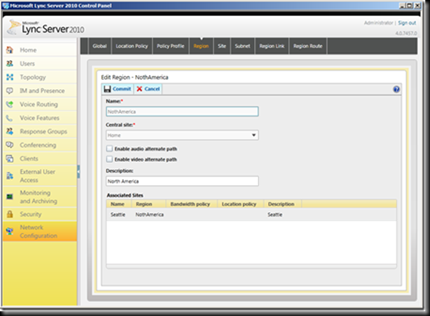
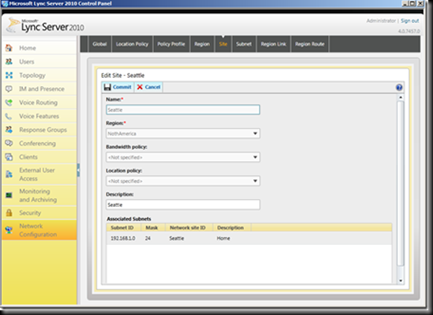
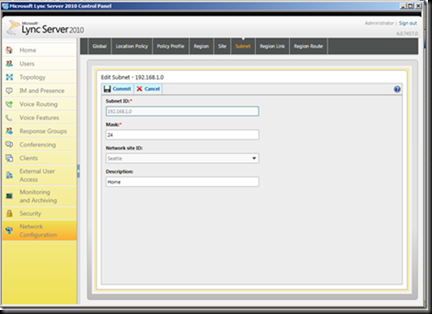
The last screen shot below shows how to enable the use of Regions and Sites to be used with Media Bypass. You can turn on Always Bypass which would prevent the use of Regions etc. The only situation I can think of where this would be a good idea is a single site Enterprise no Wifi. So very limited use case.

In the following posts I will dive deep in to the configuration of Media Bypass and CAC.
Comments welcomed.
VoIPNorm